
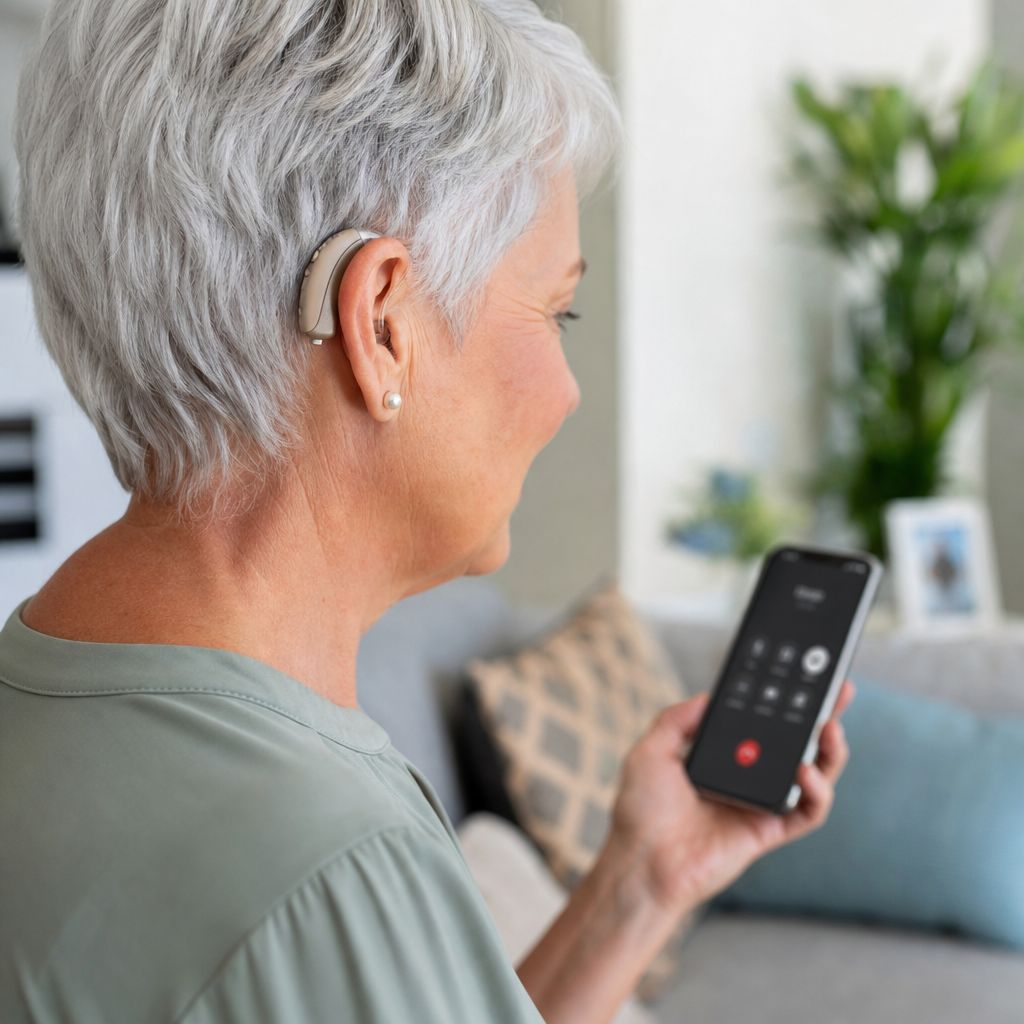
Bluetooth has changed what hearing aids can do, turning them from simple sound amplifiers into connected medical devices that link directly with phones, televisions, tablets, laptops, and remote microphones. In a guide to Bluetooth and hearing aids, the key idea is straightforward: Bluetooth is a wireless communication standard that lets compatible devices exchange audio and control signals over short distances, while modern hearing aids use that link to stream sound, adjust settings, and support hands-free communication. For anyone researching hearing aids, this matters because connectivity now affects everyday convenience as much as sound quality. Patients ask whether they can take calls, hear podcasts, join video meetings, or control volume without touching the aid. In practice, the answer depends on the hearing aid platform, the phone operating system, the Bluetooth protocol used, and whether accessories are required. I have helped people set up these systems in clinics and at home, and the same questions come up every time: will it work with my iPhone, my Android phone, my TV, and my lifestyle? This hub article explains the general landscape clearly so you can understand features, compatibility, benefits, limits, and buying considerations before drilling into more specialized topics within hearing aids.
What Bluetooth means in hearing aids
Bluetooth in hearing aids usually refers to wireless audio streaming and device control, but not every Bluetooth implementation is the same. Traditional Bluetooth Classic has been used for higher-bandwidth audio in many consumer electronics. Hearing aids, however, have long depended on low-power variations because battery size is extremely limited. Apple introduced Made for iPhone hearing aid support using Bluetooth Low Energy with a proprietary audio approach, allowing direct streaming to compatible hearing aids without an intermediate neck-worn accessory. Android support expanded later through Audio Streaming for Hearing Aids, often shortened to ASHA, which enabled direct streaming on many compatible Android devices. More recently, Bluetooth LE Audio and the LC3 codec have become central developments because they promise more efficient audio transmission, lower power use, better broadcast audio support, and broader standardization across brands and phones.
That technical detail matters because it determines real-world usability. Two hearing aids may both be advertised as Bluetooth hearing aids, yet one may stream calls and music directly from both iPhone and Android, while another may need an accessory for some tasks. Some systems support two-way hands-free calling with built-in microphones routed back to the phone; others stream incoming audio only and still rely on the phone microphone for your voice. Range is usually around a room, not a whole house, and walls, body position, and radio interference can reduce reliability. In short, Bluetooth hearing aids are not one universal category. They are a family of connectivity approaches built around power efficiency, compatibility, and user priorities.
How Bluetooth hearing aids are used day to day
The most immediate benefit of Bluetooth hearing aids is direct streaming. Phone calls can arrive in both ears instead of through a tiny handset speaker. Turn-by-turn navigation can be heard clearly while walking or driving. Television audio can stream through a dedicated transmitter, reducing the need to raise room volume for everyone else. Many users also stream music, podcasts, audiobooks, and video calls, which can improve speech clarity compared with listening through a phone speaker in a noisy room.
Control is the second major use. Most major hearing aid brands now offer smartphone apps that adjust volume, switch listening programs, check battery status, locate misplaced aids, and sometimes connect with remote support. Signia, Oticon, Phonak, ReSound, Starkey, Widex, and Unitron all provide app-based control, though feature depth varies. In fitting sessions, I often show people how much independence this adds. Instead of returning to the clinic for every small preference change, users can make safe adjustments within clinician-defined limits. Remote fine-tuning has also become common, letting providers update settings after a follow-up video or phone consultation.
Bluetooth can also support assistive accessories. Remote microphones improve speech understanding in noise by placing the microphone near the speaker, then transmitting the voice directly to the hearing aids. TV streamers handle stable television audio with less latency than some phone-based workarounds. Some classroom and workplace systems interface with hearing technology through receivers, streamers, or telecoil alternatives. For many people, connectivity is not a luxury feature. It is what makes hearing aids functional in modern communication environments.
Compatibility with iPhone, Android, TVs, and computers
Compatibility is the issue that causes the most confusion, so it should be checked before purchase, not after fitting. iPhone generally offers the most predictable experience because Apple tightly controls hardware and software. Many hearing aids support direct pairing through the accessibility menu, allowing calls, media streaming, and system sound routing. Android is more variable. Even if a hearing aid brand supports ASHA or newer Bluetooth LE Audio features, performance still depends on the phone manufacturer, Android version, and model-specific implementation. Google Pixel and recent Samsung Galaxy models often support direct streaming well, but support can differ even within the same brand lineup.
TV and computer connections vary by manufacturer. Some hearing aids pair directly with certain computers, but many users still need a proprietary TV streamer or intermediary accessory for reliable stereo audio and low delay. Windows PCs are less consistent than phones because generic Bluetooth audio profiles do not always map neatly to hearing aid protocols. Mac support can also differ by brand and generation. For this reason, reputable clinics maintain compatibility lists and test devices whenever possible.
| Device type | Typical connection method | What usually works | Common limitation |
|---|---|---|---|
| iPhone | Direct pairing in accessibility settings | Calls, media, app control | Feature set depends on hearing aid generation |
| Android phone | ASHA or LE Audio on compatible models | Media streaming, app control, sometimes calls | Model-by-model variability |
| Television | Brand-specific TV streamer | Stable private listening | Extra accessory cost |
| Laptop or desktop | Direct pairing or accessory bridge | Meeting audio, media playback | Microphone and latency issues |
Before choosing hearing aids, ask for the exact compatibility page from the manufacturer and test your own phone in the clinic. That single step prevents a large share of returns and frustration.
Benefits, limitations, and performance tradeoffs
Bluetooth hearing aids offer meaningful advantages, but the tradeoffs should be understood clearly. The benefits include convenience, better access to speech on calls, more discreet listening, and tighter integration with daily devices. Streaming can also reduce listening effort because the signal bypasses room acoustics and reaches the hearing aid directly. For people with mild to moderate hearing loss who spend much of the day on phones or video meetings, connectivity can be one of the strongest predictors of satisfaction.
Battery life is the first major tradeoff. Streaming audio consumes more power than standard environmental amplification, especially during extended calls or all-day media use. Rechargeable hearing aids have made this easier to manage, but heavy streamers still need realistic expectations. Disposable battery models can drain faster as well, which affects ongoing cost. The second tradeoff is reliability. Bluetooth is robust, but not perfect. Pairing failures, temporary dropouts, software update conflicts, and app bugs occur across all brands. Environmental factors such as crowded radio frequencies, a phone kept in a back pocket on the opposite side of the body, or outdated firmware can all affect signal stability.
Audio quality is another area where expectations should be calibrated. Hearing aids are designed first for speech audibility, not for the full-frequency, high-output listening experience of premium headphones. Music streaming has improved substantially, and some devices provide dedicated music programs, but hearing aid receivers remain tiny, feedback constraints remain real, and ear acoustics differ from earbuds. Latency can also matter for video. If streamed audio reaches the aids slightly after lip movements on screen, users may notice an echo or synchronization issue, especially when room sound is audible at the same time. TV transmitters often solve this better than direct generic pairing.
There are also privacy and practical considerations. App permissions, cloud-based remote support tools, and account-linked features should be reviewed carefully. Waterproofing ratings vary, so gym use and humid conditions need attention. Bluetooth improves access, but it does not replace a good hearing aid fitting, accurate real-ear verification, or individualized counseling.
How to choose Bluetooth hearing aids wisely
The best way to choose Bluetooth hearing aids is to start with listening needs, not brand advertising. A person who mainly wants easier phone calls may need different features than someone who watches television for hours, attends online meetings, and uses both an iPhone and a work laptop. Style matters too. Behind-the-ear and receiver-in-canal models generally have more room for antennas, batteries, and wireless hardware than the smallest invisible designs. That is one reason ultra-small custom aids may offer fewer connectivity features or shorter battery life.
Ask specific questions during a hearing aid evaluation. Does this model support direct streaming with my exact phone? Are calls truly hands-free, or does my phone microphone still pick up my voice? Can I pair to two devices at once? Is a TV accessory included, optional, or unavailable? How are firmware updates installed? What happens if I change from iPhone to Android next year? Good providers answer these questions precisely and will document compatibility in writing.
It is also smart to consider service structure. Brands differ in app quality, accessory ecosystems, and remote-care platforms. Some excel at universal Bluetooth connectivity; others are stronger in noise reduction, rechargeable performance, tinnitus features, or custom fitting options. No single product is best for everyone. In practice, the right choice is the one that matches your hearing loss, dexterity, phone habits, budget, and willingness to troubleshoot technology.
Trial periods are essential. In many markets, hearing aids are sold with a return or adjustment window. Use that period intensively. Take calls outdoors, stream from the TV in the evening, join a video meeting, walk around the house, and test battery endurance on a normal day. Bluetooth hearing aids should fit into life without constant management. If they do not, the issue may be fixable through settings, accessories, or a different platform.
Setup, troubleshooting, and future trends
Successful setup begins with updated software on both the hearing aids and the source device. Pairing should be done exactly as the manufacturer recommends, since hearing aids often use accessibility menus rather than the standard Bluetooth audio menu. If connections fail, the most effective first steps are simple: unpair the devices, restart both, recharge fully, update the app, and pair again in the correct order. Many persistent issues come from incomplete initial pairing or old firmware.
Common troubleshooting patterns repeat across brands. If streaming drops when the phone is in a pocket, body shielding may be the cause. If one aid disconnects, the binaural link between the left and right devices may need resetting. If app control works but audio streaming does not, the phone may support control protocols without supporting the necessary audio streaming profile. In clinics, I also see problems caused by users pairing through the wrong screen, mixing old and new accessories, or forgetting that replacing one hearing aid can require the entire Bluetooth relationship to be rebuilt.
Looking ahead, Bluetooth LE Audio is likely to improve the hearing aid experience substantially. Auracast broadcast audio is especially important because it could let public venues such as airports, lecture halls, theaters, gyms, and houses of worship transmit audio directly to compatible hearing aids without requiring dedicated loaner receivers. Wider adoption will take time because both transmitters and hearing devices must support the standard, but the direction is clear. Hearing aids are becoming more interoperable, more efficient, and more integrated into mainstream consumer audio ecosystems.
Bluetooth and hearing aids now belong in the same conversation because hearing care is no longer only about amplification; it is about connection, access, and day-to-day usability across the devices people already depend on. The essentials are clear: Bluetooth hearing aids can stream calls and media, connect with apps and accessories, and improve convenience in ways that matter every day, but compatibility, battery impact, and device-specific limitations must be checked carefully. The smartest buying process starts with your real listening environments, verifies support for your exact phone and television setup, and uses a proper trial period to test performance. When connectivity is matched well, hearing aids feel less like standalone medical devices and more like seamless communication tools. Use this guide as your starting point, then compare specific hearing aid styles, brands, and connectivity articles within the broader Hearing Aids topic so you can choose with confidence.
Frequently Asked Questions
What does Bluetooth do in hearing aids?
Bluetooth allows hearing aids to communicate wirelessly with compatible devices such as smartphones, tablets, televisions, laptops, and remote microphones. Instead of acting only as sound amplifiers, modern hearing aids can receive audio directly from these devices and send control information back and forth. In practical terms, that means phone calls, music, video audio, and other sound sources can often be streamed straight to the hearing aids, rather than needing to pass through a separate speaker in the room.
Bluetooth also supports convenience features beyond audio streaming. Many hearing aids can connect to an app that lets the wearer adjust volume, switch listening programs, check battery status, or fine-tune settings for different environments. Some systems also use Bluetooth connections for accessories, such as TV streamers or partner microphones, which can improve speech clarity in noisy spaces or when the speaker is far away. The overall benefit is a more personalized, connected hearing experience that helps users hear both everyday sounds and digital audio more clearly.
Can all hearing aids connect to phones and other devices with Bluetooth?
No, not all hearing aids include Bluetooth, and not all Bluetooth-enabled hearing aids connect in exactly the same way. Older or more basic models may not have wireless connectivity at all. Among Bluetooth-capable hearing aids, compatibility can vary depending on the brand, model, operating system, and the type of Bluetooth technology being used. Some hearing aids support direct streaming with certain iPhone and Android devices, while others may require an intermediate accessory to connect to a television, computer, or even some phones.
That is why it is important to check compatibility before buying hearing aids or expecting a specific feature to work. A hearing care professional can confirm whether a hearing aid supports direct audio streaming, hands-free calling, app control, or accessory pairing with the devices you already use. It is also wise to review the manufacturer’s compatibility list, because phone software updates and hearing aid firmware versions can affect performance. In short, Bluetooth can greatly expand what hearing aids can do, but the exact experience depends on the specific technology on both sides of the connection.
How do Bluetooth hearing aids improve everyday life?
Bluetooth hearing aids can make daily listening more direct, clear, and convenient. One of the biggest advantages is the ability to stream audio straight into the hearing aids. For many users, this makes phone calls easier to follow and can improve the experience of listening to music, podcasts, video calls, navigation prompts, and television sound. Because the audio is delivered directly to the ears, it may reduce the impact of distance, room acoustics, and background noise compared with relying on external speakers alone.
They also improve day-to-day control and flexibility. Instead of adjusting hearing aids manually, users can often make changes through a smartphone app. This can be especially helpful when moving between environments such as quiet rooms, busy restaurants, outdoor spaces, or meetings. In addition, Bluetooth accessories such as remote microphones can help in challenging listening situations by sending a speaker’s voice directly to the hearing aids. For many people, these features support better communication, less listening effort, and a greater sense of confidence in work, social, and home settings.
Is Bluetooth in hearing aids difficult to set up and use?
For most people, Bluetooth hearing aids are fairly straightforward to use once they have been paired properly, but the initial setup can vary by device and manufacturer. In many cases, the process involves turning Bluetooth on in the phone or tablet, placing the hearing aids into pairing mode, and following prompts in the device settings or the hearing aid app. Some hearing aids connect automatically after the first setup, while others may need occasional reconnection, especially after software updates, battery changes, or switching to a new phone.
Even though the basic idea is simple, small differences in menus, apps, and operating systems can sometimes cause confusion. That is why many users benefit from having the setup done or reviewed by an audiologist or hearing instrument specialist. Once connected, daily use is often quite easy: answer calls, stream audio, adjust settings, and switch programs with a few taps. If problems arise, they are commonly solved by checking battery charge, making sure Bluetooth is enabled, confirming compatibility, restarting the devices, or updating the hearing aid firmware and phone software. With the right setup, Bluetooth becomes a practical tool rather than a technical burden.
Are there any limitations or things to consider with Bluetooth hearing aids?
Yes, and understanding those limitations helps set realistic expectations. Bluetooth hearing aids depend on compatibility, battery power, and stable wireless connections. Streaming audio and maintaining an active connection can increase battery use, especially with smaller rechargeable or disposable-battery hearing aids. Range is also limited, because Bluetooth is designed for short-distance communication. If a phone or other connected device is too far away, the signal may weaken or drop out. Interference from surrounding electronics, body position, or crowded wireless environments can sometimes affect performance as well.
Another important consideration is that Bluetooth convenience does not replace a proper hearing evaluation and professional fitting. The hearing aid still needs to be programmed to the wearer’s hearing loss, listening goals, and ear acoustics. Bluetooth features add flexibility and connectivity, but they are most effective when built on a well-fitted device. Users should also consider which devices they rely on most, whether they want direct streaming or are comfortable using accessories, and how important app-based controls are in daily life. When chosen carefully, Bluetooth hearing aids can be extremely helpful, but selecting the right model involves balancing hearing needs, technology preferences, and lifestyle.